As an Amazon Associate I earn from qualifying purchases. This page contains affiliate links, and I may earn a commission at no extra cost to you.
2025's Most Secure Smart Locks: Schlage Encode Plus vs Kwikset Halo Touch vs August Wi-Fi vs Yale Assure Lock 2 Comparison
It's August 2026, and the digital keys on our phones are becoming as commonplace as our physical ones. Smart locks aren't just a niche gadget anymore; they're a cornerstone of modern home security and convenience. But with so many options promising robust protection and seamless access, choosing the right one can feel like navigating a maze. Are you prioritising cutting-edge features like Apple HomeKey, or is the simplicity of a fingerprint scanner more your speed? What about integration with your existing smart home setup, or the peace of mind that comes with industry-leading security ratings?
I've dug into four of the strongest contenders in the smart lock space right now – the Schlage Encode Plus Smart WiFi Deadbolt, the Kwikset Halo Touch Smart Lock, the August Wi-Fi Smart Lock, and the Yale Assure Lock 2. Each offers a compelling blend of security and smart features, but they approach the problem from different angles. Let's break down what makes each tick and help you decide which one will best guard your castle.
Why Smart Locks Matter for Security
Gone are the days when a lock's security was solely about the strength of its metal. Today, a truly secure lock blends robust physical construction with advanced digital protection. Smart locks offer multiple layers of defence: physical resistance against forced entry, encrypted communication protocols to prevent hacking, and flexible access management that lets you grant and revoke entry permissions with a few taps on your phone. Beyond just security, they bring a level of convenience that's hard to go back from – no more fumbling for keys, remote access for guests or deliveries, and activity logs so you always know who's coming and going. The best smart locks integrate these aspects so seamlessly that you barely notice them working, until you truly need them.
How We Evaluated These Smart Locks
Picking a smart lock isn't just about the flashiest features; it's about finding a reliable guardian for your home. My evaluation focuses on a few critical areas that genuinely impact your daily experience and long-term peace of mind:
Security Standards
This is non-negotiable. I look at the ANSI/BHMA grading for physical security. Grade 1 is the highest residential standard, indicating superior resistance to forced entry. Grade 2 is still very good for most homes. Beyond physical strength, I consider the encryption methods used for wireless communication, and any unique features that deter tampering or unauthorized access attempts.
Connectivity & Integration
A smart lock is only as smart as its ability to talk to other devices. Direct Wi-Fi is fantastic for avoiding extra hubs, but some locks excel with Bluetooth for local control or specific protocols like Z-Wave, Zigbee, or Matter for broader smart home ecosystems. Apple HomeKit and Google Home compatibility are major pluses for users already invested in those platforms, especially when it comes to voice control and automation.
User Experience
How easy is it to install? How intuitive is the app? Does it drain batteries too fast? Can guests easily gain access without needing a complicated setup? These are the real-world questions that determine if a smart lock is a joy or a chore to own. I also consider the variety of access methods: keypads, fingerprint readers, phone apps, voice commands, and traditional keys are all on the table.
Build Quality & Durability
Your front door lock faces the elements and daily wear and tear. A cheap plastic housing isn't going to cut it. I look for robust metal construction, weather resistance, and mechanisms designed for longevity. Customer feedback often highlights where products fall short in terms of durability, so that's a key part of the research.
The Contenders: A Deep Dive
Schlage Encode Plus Smart WiFi Deadbolt
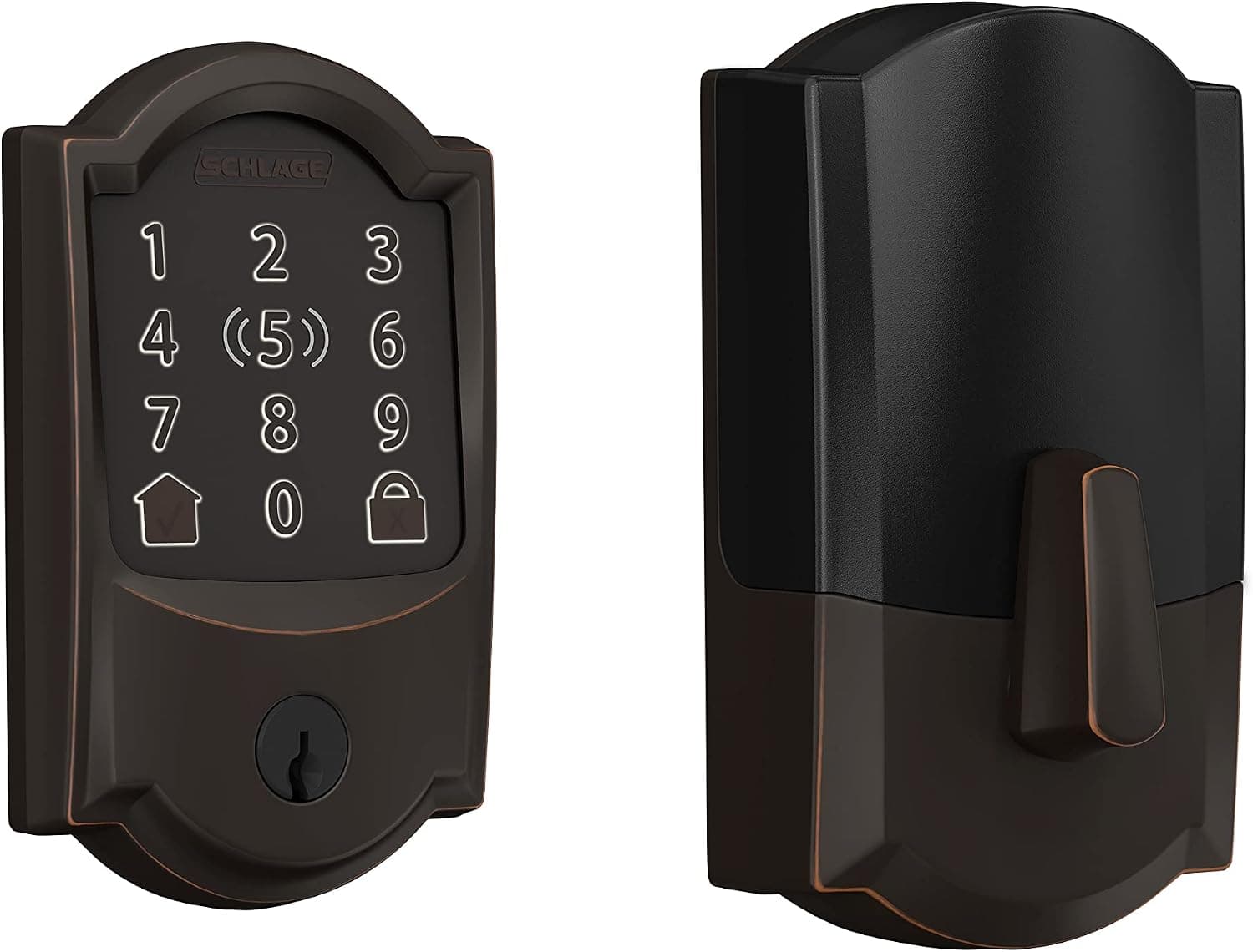
The Schlage Encode Plus Smart WiFi Deadbolt is a heavyweight in the smart lock arena, particularly if you're deep in the Apple ecosystem. Its standout feature is native Apple HomeKey support, allowing you to unlock your door with a simple tap of your iPhone or Apple Watch. It's truly a game-changer for convenience and feels incredibly secure, leveraging Apple's robust security framework.
Design & Build
Schlage has consistently delivered on build quality, and the Encode Plus is no exception. It feels substantial in hand, constructed from durable metal that suggests it can withstand years of use and abuse. Available in several finishes, it can blend with various door styles, though its design is more functional than overtly stylish. It’s a deadbolt replacement, so it's a visible presence on your door, but not unduly bulky compared to many competitors.
Key Features
- Apple HomeKey: This is the headline. Tap your iPhone or Apple Watch to unlock – no app required once set up.
- Built-in Wi-Fi: Connects directly to your home network, so no additional hub is needed for remote access or smart home integration.
- Keypad: A responsive touchscreen keypad for code entry, supporting up to 100 access codes.
- ANSI Grade 1 Security: The highest residential security rating, offering superior resistance to forced entry.
- App Control: Manage codes, view activity, and lock/unlock remotely via the Schlage Home app.
- Traditional Key: Always a reliable fallback.
Performance
Based on published specs and verified owner feedback, the Encode Plus performs reliably. HomeKey access is swift and responsive, often faster than fiddling with an app. The keypad is accurate and illuminates well in the dark. Battery life, a common concern for Wi-Fi locks, is respectable, often lasting several months on four AA batteries before needing a change. Wi-Fi connectivity generally holds steady, though like any Wi-Fi device, it's dependent on your home network's strength.
Value
The Encode Plus sits firmly in the premium price band, often costing roughly £250-£300. This is undeniably a significant investment. However, for Apple users, the seamless HomeKey integration alone can justify the cost. For anyone else, the Grade 1 security, direct Wi-Fi, and robust build still make it a strong contender, though perhaps a slightly less compelling value if you won't use HomeKey.
Pros & Cons
- Pros: Unbeatable Apple HomeKey integration; excellent ANSI Grade 1 physical security; direct Wi-Fi (no hub needed); reliable touchscreen keypad; solid build quality.
- Cons: Premium price; can be bulkier than some retrofit options; battery life is good for a Wi-Fi lock but not as long as Bluetooth-only models.
Who Should Buy
Dedicated Apple users looking for the ultimate in convenience and security, and anyone prioritising top-tier physical security and direct Wi-Fi connectivity.
Kwikset Halo Touch Smart Lock
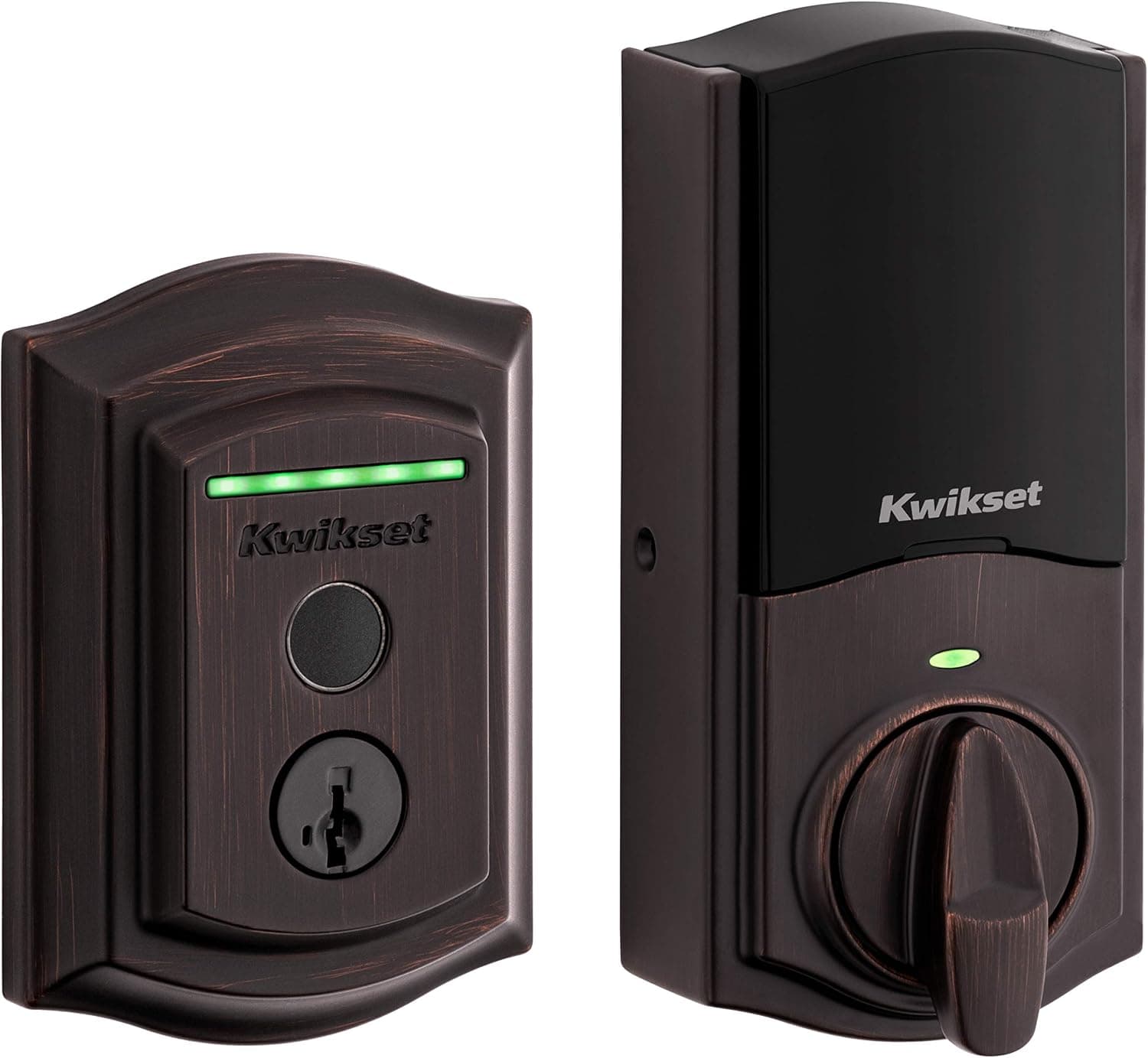
The Kwikset Halo Touch Smart Lock takes a different approach to quick access by integrating a fingerprint scanner. If you've ever wished you could just touch your door and have it unlock, this is the lock for you. It offers a truly keyless experience and cuts out the need for remembering codes or fumbling for your phone.
Design & Build
The Halo Touch boasts a sleek, modern aesthetic, particularly on the exterior where the fingerprint sensor is elegantly integrated. It feels solid and well-constructed from metal, designed to withstand outdoor conditions. It replaces your existing deadbolt, and while it's a noticeable presence, it's generally less obtrusive than some other full-feature smart locks. Inside, the design is clean, with the battery compartment easily accessible.
Key Features
- Fingerprint Access: Store up to 100 fingerprints for quick, secure entry.
- Built-in Wi-Fi: Provides remote control and monitoring without a separate hub.
- Kwikset App Control: Manage users, fingerprints, and settings from your smartphone.
- Automatic Locking: Customisable auto-lock feature for peace of mind.
- ANSI Grade 2 Security: A very good level of residential security, offering strong resistance.
- Traditional Key: A physical key is included for backup.
Performance
The fingerprint sensor, based on owner feedback, is generally fast and accurate, though like all biometric sensors, it can occasionally struggle with wet or very dry fingers. The built-in Wi-Fi provides consistent connectivity for remote control and notifications. Battery life is typically good, often lasting 6-9 months on four AA batteries, as it's not constantly polling for HomeKey or Matter. The Kwikset app is functional and straightforward, if a bit basic compared to some competitors.
Value
Positioned in the mid-to-premium range, the Halo Touch typically costs around £200-£250. This is a fair price for a deadbolt replacement with direct Wi-Fi and a reliable fingerprint scanner. Its value is particularly high for families or individuals who want to ditch keys and codes entirely, preferring the sheer speed and simplicity of biometric access.
Pros & Cons
- Pros: Fast and convenient fingerprint access; direct Wi-Fi (no hub needed); solid metal construction; good battery life for a Wi-Fi lock; easy to manage multiple users.
- Cons: No keypad option (fingerprint or app only); fingerprint sensor can be finicky in certain conditions; app is functional but lacks some advanced features seen elsewhere.
Who Should Buy
Anyone who wants the ultimate keyless convenience through fingerprint recognition, especially if they have multiple users who would benefit from quick, code-free entry.
August Wi-Fi Smart Lock
The August Wi-Fi Smart Lock stands out for its unique retrofit design. Instead of replacing your entire deadbolt, it attaches to the inside of your existing one. This means you keep your current keys and the exterior appearance of your door remains unchanged, which is ideal for renters or those who prefer a less visible smart lock solution.
Design & Build
August locks have a distinctive cylindrical shape that mounts on the interior side of your door. It's built with a sturdy metal casing, giving it a premium feel. The compact design of the Wi-Fi version is a significant improvement over previous August models, which required an external bridge for Wi-Fi functionality. The magic here is that it doesn't touch the exterior of your door at all, making it completely discreet from the outside.
Key Features
- Retrofit Installation: Mounts over your existing deadbolt's interior thumbturn, preserving your exterior lock and keys.
- Built-in Wi-Fi: Directly connects to your home network for remote access without an additional hub.
- Auto-Lock and Auto-Unlock: Locks automatically when you leave and unlocks as you approach, using geofencing.
- Virtual Keys: Grant temporary or permanent access to guests via the August app, perfect for Airbnb hosts or pet sitters.
- Activity Feed: Tracks who comes and goes, and when.
- Voice Control: Integrates with Amazon Alexa, Google Assistant, and Apple HomeKit for hands-free operation.
Performance
The August Wi-Fi Smart Lock is known for its relatively straightforward installation, typically taking less than 15 minutes. Its auto-lock and auto-unlock features work quite well, though geofencing can sometimes be a little inconsistent depending on your phone and location settings. The August app is excellent, providing robust control over guest access and activity logs. Battery life, using two CR123 batteries, is often around 3-6 months, which is decent for a Wi-Fi-enabled device that also powers the motor for your existing deadbolt.
Value
The August Wi-Fi Smart Lock usually falls into the mid-range price bracket, often available for around £180-£220. For a Wi-Fi-enabled smart lock with such flexible guest access features and a discreet design, it offers strong value, especially for those who can't or don't want to replace their entire deadbolt.
Pros & Cons
- Pros: Easy retrofit installation (keeps existing keys); discreet exterior appearance; built-in Wi-Fi; excellent guest access management; robust auto-lock/unlock features.
- Cons: No built-in keypad (optional accessory); relies on the security of your existing deadbolt; battery life can be shorter than some dedicated deadbolt replacements.
Who Should Buy
Renters, those who want to retain their existing keys and exterior door aesthetic, or anyone prioritising seamless guest access management and smart home integration without a full deadbolt replacement.
Yale Assure Lock 2
The Yale Assure Lock 2 represents Yale's commitment to modernising its smart lock lineup, offering a sleek design and highly modular connectivity. It's a versatile option that can grow with your smart home, thanks to swappable modules for different protocols, including the much-anticipated Matter standard.
Design & Build
Yale has really stepped up its game with the Assure Lock 2's design. It's notably more compact and streamlined than previous generations, making it one of the more aesthetically pleasing full deadbolt replacements. It's available in several finishes and comes in both keypad and key-free (no physical keyway) versions. The build quality is solid, using durable metal components, ensuring it feels premium and robust.
Key Features
- Modular Connectivity: Supports swappable modules for Wi-Fi, Z-Wave, and Bluetooth. Matter modules are also available, making it highly future-proof.
- Compact Design: A sleek, smaller form factor compared to many smart locks.
- Keypad (optional): Choose between models with a tactile keypad for code entry or a key-free version for maximum security against lock picking.
- Yale Access App: Manage access codes, view history, and control the lock remotely (with Wi-Fi module).
- Auto-Lock: Customisable automatic locking after a set time.
- DoorSense Technology: Knows if your door is open or closed, not just locked or unlocked.
Performance
Based on published specs and verified owner feedback, the Assure Lock 2 installs more easily than previous Yale models, and its operation is smooth and quiet. The keypad, when present, is responsive and clear. The performance heavily relies on the chosen connectivity module; the Wi-Fi module provides robust remote control, while the Matter module offers excellent local control and multi-ecosystem compatibility. Battery life with a Wi-Fi module is typically 4-6 months, using four AA batteries, which is reasonable given its capabilities.
Value
The Yale Assure Lock 2 sits in the mid-to-premium range, with prices varying from roughly £180-£280 depending on whether you opt for a keypad version and which connectivity module you choose. Its modularity offers excellent long-term value, allowing you to upgrade connectivity as your smart home evolves, making it a sound investment for future-proofing your home security.
Pros & Cons
- Pros: Modern, compact design; highly modular connectivity (including Matter support); reliable performance; DoorSense for accurate door status; available in key-free options for enhanced security.
- Cons: Connectivity modules add to the cost; battery life is decent but not exceptional with Wi-Fi module; some versions lack a physical key backup (important to note before buying).
Who Should Buy
Those looking for a stylish, compact smart lock with flexible and future-proof connectivity options, especially if they are interested in Matter for broader smart home integration.
Smart Lock Comparison Table
| Product | Key Feature | Connectivity | Authentication | Price Band | Verdict | Buy |
|---|---|---|---|---|---|---|
| Schlage Encode Plus Smart WiFi Deadbolt | Apple HomeKey | Wi-Fi, Bluetooth | HomeKey, Keypad, App, Key | Premium (£250-£300) | The gold standard for Apple users. | Check on Amazon |
| Kwikset Halo Touch Smart Lock | Fingerprint Sensor | Wi-Fi, Bluetooth | Fingerprint, App, Key | Mid-Premium (£200-£250) | Ultimate keyless convenience. | Check on Amazon |
| August Wi-Fi Smart Lock | Retrofit Design | Wi-Fi, Bluetooth | App, Voice, Key | Mid-Range (£180-£220) | Discreet and excellent for renters. | Check on Amazon |
| Yale Assure Lock 2 | Modular Connectivity (Matter) | Modules (Wi-Fi, Z-Wave, Matter, Bluetooth) | Keypad (optional), App, Key (optional) | Mid-Premium (£180-£280) | Future-proof versatility. | Check on Amazon |
Alternatives to Consider
While the locks above are strong contenders, your specific needs might point you elsewhere. Here are a couple of genuinely different options:
Level Bolt Smart Lock
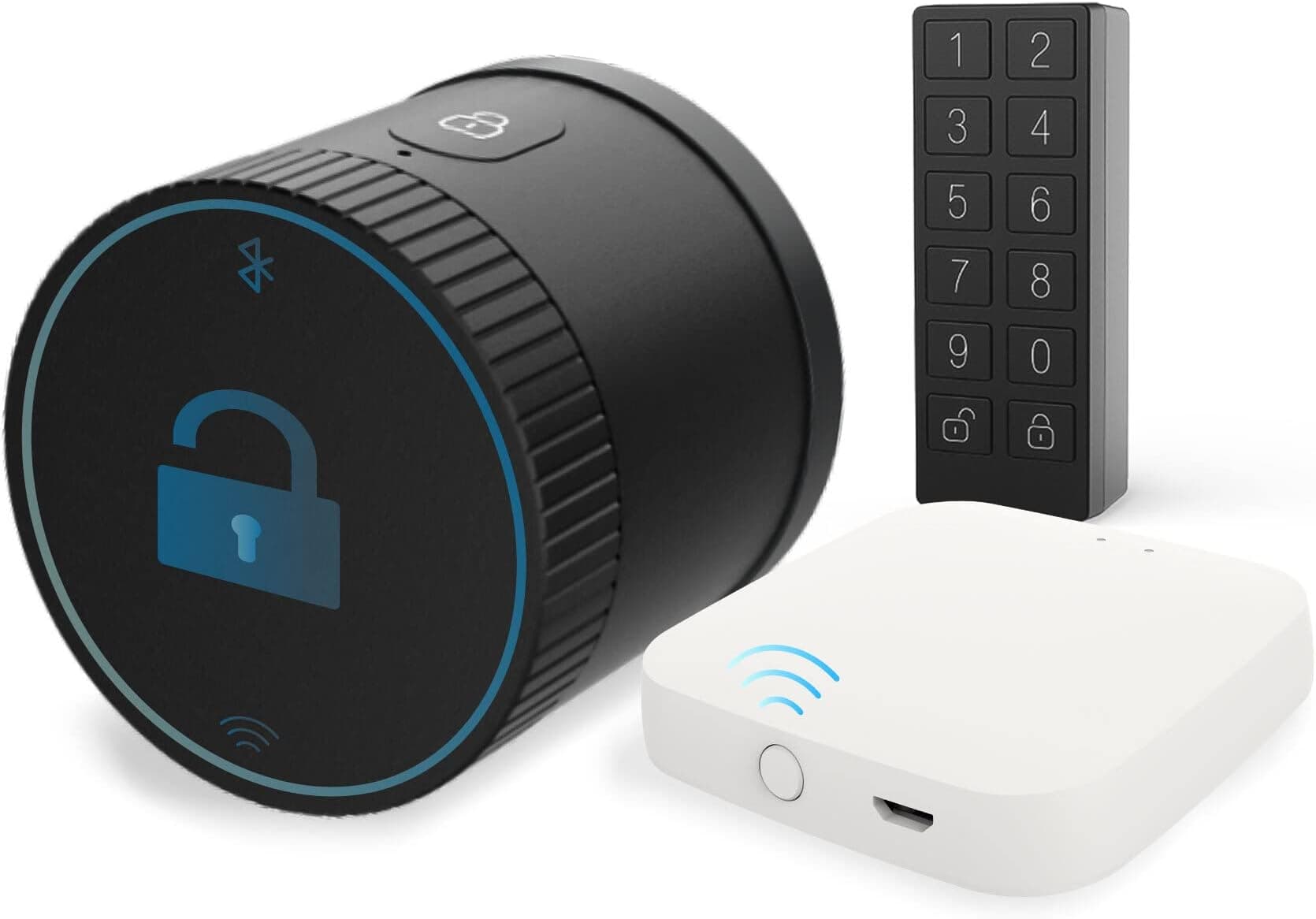
For those who absolutely, positively do not want any visible smart lock hardware, the Level Bolt Smart Lock is in a class of its own. It's the world's first invisible smart lock, converting your existing deadbolt into a smart one while hiding all its technology *inside* the door. You keep your existing keys and the exterior looks exactly as it always has. It connects via Bluetooth and requires a Level Connect hub (sold separately) for Wi-Fi and remote access. It’s pricier and relies purely on Bluetooth for local access, but its discreetness is unmatched. It’s a compelling choice if aesthetics are your absolute top priority and you don't mind the hub requirement for full smarts.
Schlage Encode Smart WiFi Deadbolt (Non-Plus)
If the Schlage Encode Plus Smart WiFi Deadbolt's price tag is a bit much, or you're not an Apple HomeKey user, the original Schlage Encode Smart WiFi Deadbolt is still an excellent choice. It offers the same built-in Wi-Fi and robust ANSI Grade 1 security as its 'Plus' sibling, but without the HomeKey functionality. This often translates to a slightly lower price point, making it a fantastic option for those who want Schlage's reliability and direct Wi-Fi connectivity with a keypad, but don't need the Apple-specific feature.
Our Top Pick: Which Smart Lock Should You Buy?
After weighing all the features, security aspects, and real-world usability, my top pick for most people is the Schlage Encode Plus Smart WiFi Deadbolt. It combines the highest residential security rating (ANSI Grade 1) with unparalleled convenience for Apple users via HomeKey, plus direct Wi-Fi for everyone else. It’s a premium investment, but one that genuinely elevates your home security and smart living experience, providing both robust physical protection and seamless digital access.
Final Thoughts and Verdict
Each of these smart locks brings a compelling set of features to the table, and the 'best' one truly depends on your specific priorities. If you live in an Apple-centric home, the Schlage Encode Plus is a no-brainer. For pure keyless convenience via biometrics, the Kwikset Halo Touch is incredibly appealing. Renters or those who value discretion will find the August Wi-Fi Smart Lock a perfect fit, while the Yale Assure Lock 2 offers a stylish, future-proof solution for a evolving smart home. Ultimately, all four provide a significant upgrade to traditional deadbolts, merging robust security with the effortless control modern homeowners expect.
Ready to secure your home with the best smart lock for you? Explore the Schlage Encode Plus Smart WiFi Deadbolt on Amazon today.