As an Amazon Associate I earn from qualifying purchases. This page contains affiliate links, and I may earn a commission at no extra cost to you.
Beyond the Tablet: Igniting Curiosity with STEM Robot Toys
For parents navigating the digital age, finding toys that genuinely engage children's minds without defaulting to passive screen time is a constant quest. Tablets and phones are ubiquitous, but the magic of physical, interactive play — especially when it teaches real-world skills — remains irreplaceable. That's where STEM (Science, Technology, Engineering, and Maths) robot toys come in. These aren't just gadgets; they're tools designed to foster critical thinking, problem-solving, and a fundamental understanding of how technology works, often in remarkably creative and emotionally engaging ways.
We're talking about more than just remote-controlled cars here. Today's educational robots bring coding to life, build spatial awareness, and some even develop unique personalities, offering a blend of learning and imaginative play that keeps kids coming back. The market is full of options, from completely screen-free logic puzzles for preschoolers to sophisticated, app-driven robots for older children. Let's delve into some of the most compelling options available in August 2026, comparing how they stack up in design, features, and overall educational value.
Why Invest in STEM Robot Toys?
Parents often wonder if these toys are worth the investment over traditional playthings. The answer, for many, is a resounding yes. These robots offer:
- Hands-on Coding Introduction: Many models teach foundational coding concepts like sequencing, loops, and conditionals in a tangible way, demystifying abstract programming logic.
- Problem-Solving Skills: Kids learn to debug, experiment, and strategize as they figure out how to make their robot accomplish tasks or navigate challenges.
- Creativity and Imagination: Beyond just following instructions, children are encouraged to invent new games, stories, and solutions with their robotic companions.
- Reduced Passive Screen Time: While some robots use an app for programming, this is active, purposeful screen engagement, a stark contrast to passively watching videos. Many offer entirely screen-free modes too.
- Preparation for the Future: Understanding technology and computational thinking is becoming increasingly vital in almost every field. These toys provide an early, fun head start.
Cubetto Primo: The Screen-Free Coding Adventure for Little Ones
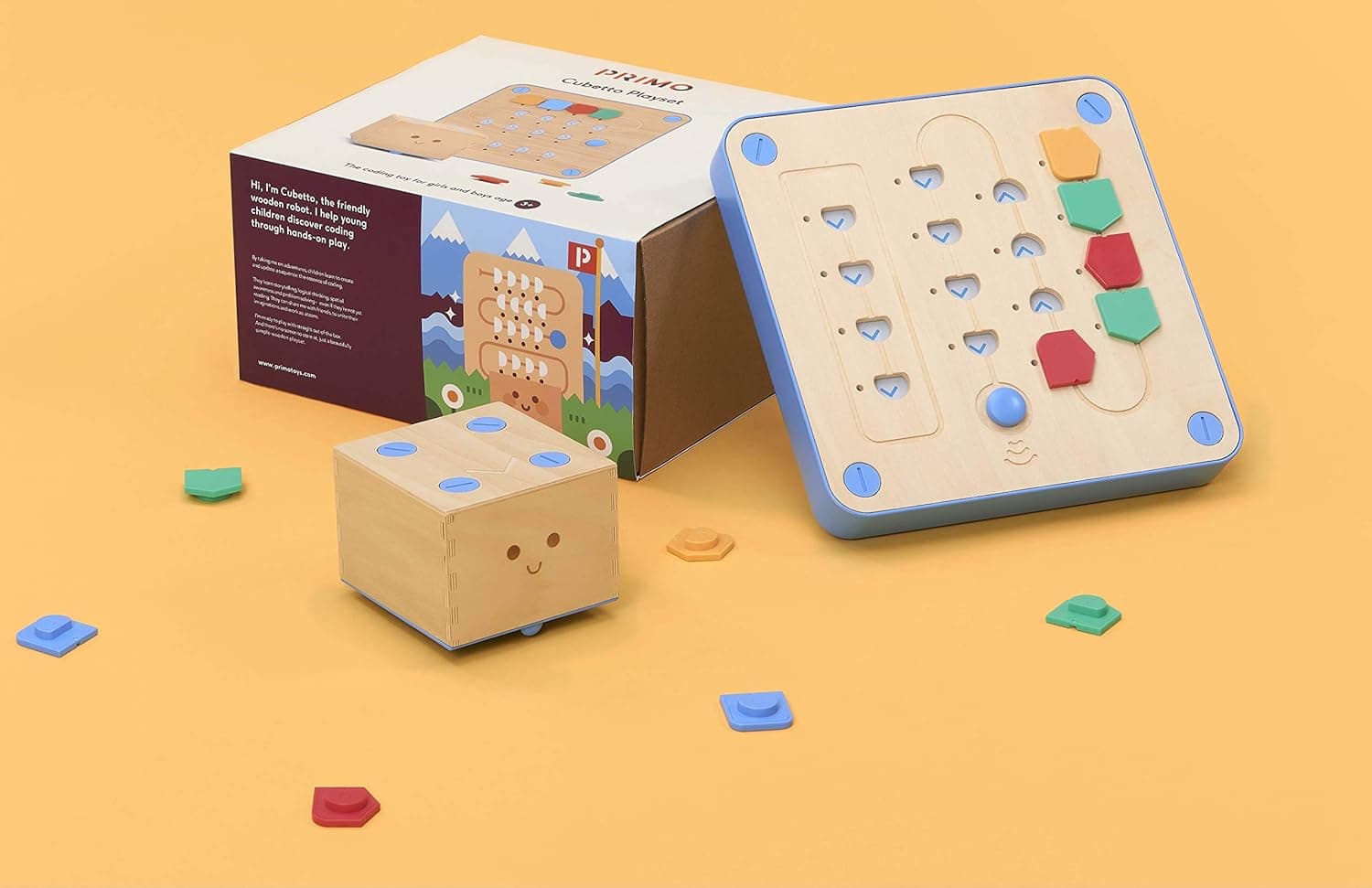
The Cubetto Primo is a truly unique offering, specifically designed for preschoolers aged 3 to 6. It throws screens completely out the window, opting for a tangible, block-based programming interface. Kids place colourful wooden blocks into a programming board, and Cubetto, a friendly wooden robot, moves according to the sequence. Each block represents a different command: forward, left, right, or a function block for subroutines.
Design and Build
Cubetto Primo is beautiful. Made from tactile, robust wood, it feels more like a classic toy than a piece of tech, a huge plus for parents concerned about plastics. The robot itself is a simple, charming cube, and the programming board is similarly well-crafted. Everything about its design screams durability and child-friendliness. The large, distinct blocks are easy for small hands to manipulate, and there are no small parts to worry about.
Key Features
- Screen-Free Learning: This is Cubetto's superpower. No apps, no tablets, just physical interaction.
- Tangible Coding Blocks: Children physically build sequences, which helps develop motor skills alongside logical thinking.
- Story-Driven Play: Cubetto comes with storybooks and world maps that provide scenarios for children to program Cubetto through, turning coding into an imaginative adventure.
- Progressive Learning: While simple to start, expansion packs (sold separately) introduce more complex concepts like negation and randomisation, extending its lifespan.
Performance
Cubetto Primo performs exactly as intended: consistently and reliably. The robot responds promptly to the inserted blocks, making the cause-and-effect relationship crystal clear for young minds. Its movements are smooth, if a little slow, which is appropriate for its target audience. The simplicity is its strength; there's very little to go wrong, and it requires minimal adult intervention once the concept is grasped.
Value
This is where Cubetto can raise eyebrows. It sits in the premium price bracket, often costing around £150-£200, which is a significant outlay for a toy that, at its core, teaches four basic commands. However, its exceptional build quality, genuinely screen-free approach, and the fact it's a staple in many early years education settings speak to its pedagogical value. For parents prioritising a tactile, high-quality, and truly screen-less introduction to computational thinking, the value proposition holds up.
Who Should Buy Cubetto Primo?
Parents of preschoolers (3-6) looking for an exceptionally well-made, screen-free, and intuitive introduction to coding fundamentals, especially those who appreciate traditional toy aesthetics alongside modern educational principles.
Bee-Bot: The Classroom Classic for Early Programmers
The Bee-Bot is another stalwart in early years education, often found in primary school classrooms teaching the very basics of directional programming. This cheerful, yellow bee-shaped robot uses simple buttons on its back for programming movement, making it entirely screen-free and accessible even to very young children.
Design and Build
The Bee-Bot is built like a tank. Its chunky, durable plastic shell is designed to withstand the rigours of classroom use, meaning it can take a fair amount of knocks and drops at home. The buttons are large, clear, and satisfyingly tactile – a 'forward' arrow, 'backward', 'left turn', 'right turn', 'pause', 'go', and 'clear'. Its simple, friendly appearance is immediately inviting to children.
Key Features
- Direct Button Programming: No app, no computer. Children input sequences directly onto the robot's back.
- Step-by-Step Movement: Bee-Bot moves in 15cm steps and turns in 90-degree increments, which makes planning paths on grids (often used with optional playmats) very straightforward.
- Memory for Multiple Commands: It can store up to 200 commands, allowing for surprisingly complex sequences for a toy of its apparent simplicity.
- Sound and Light Feedback: Confirms button presses and successful execution of commands, aiding understanding.
Performance
Bee-Bot is incredibly reliable and consistent. Each button press is registered with a clear beep, and its movements are precise. This precision is crucial for teaching sequencing, as children can accurately predict where it will end up. It's slower than other robots, which again is ideal for its target age group, allowing children time to observe and correct their programming.
Value
Bee-Bot is a solid investment for early years programming. Priced typically around £50-£70, it's more affordable than Cubetto Primo while still offering exceptional durability and direct educational value. Its widespread use in schools speaks volumes about its effectiveness. It might be outgrown sooner by highly curious children than some more versatile options, but it lays a rock-solid foundation.
Who Should Buy Bee-Bot?
Parents of children aged 3-8 looking for an extremely durable, no-frills, and entirely screen-free way to teach basic directional programming, sequencing, and estimation. It's particularly good for fostering independent play and logical thinking.
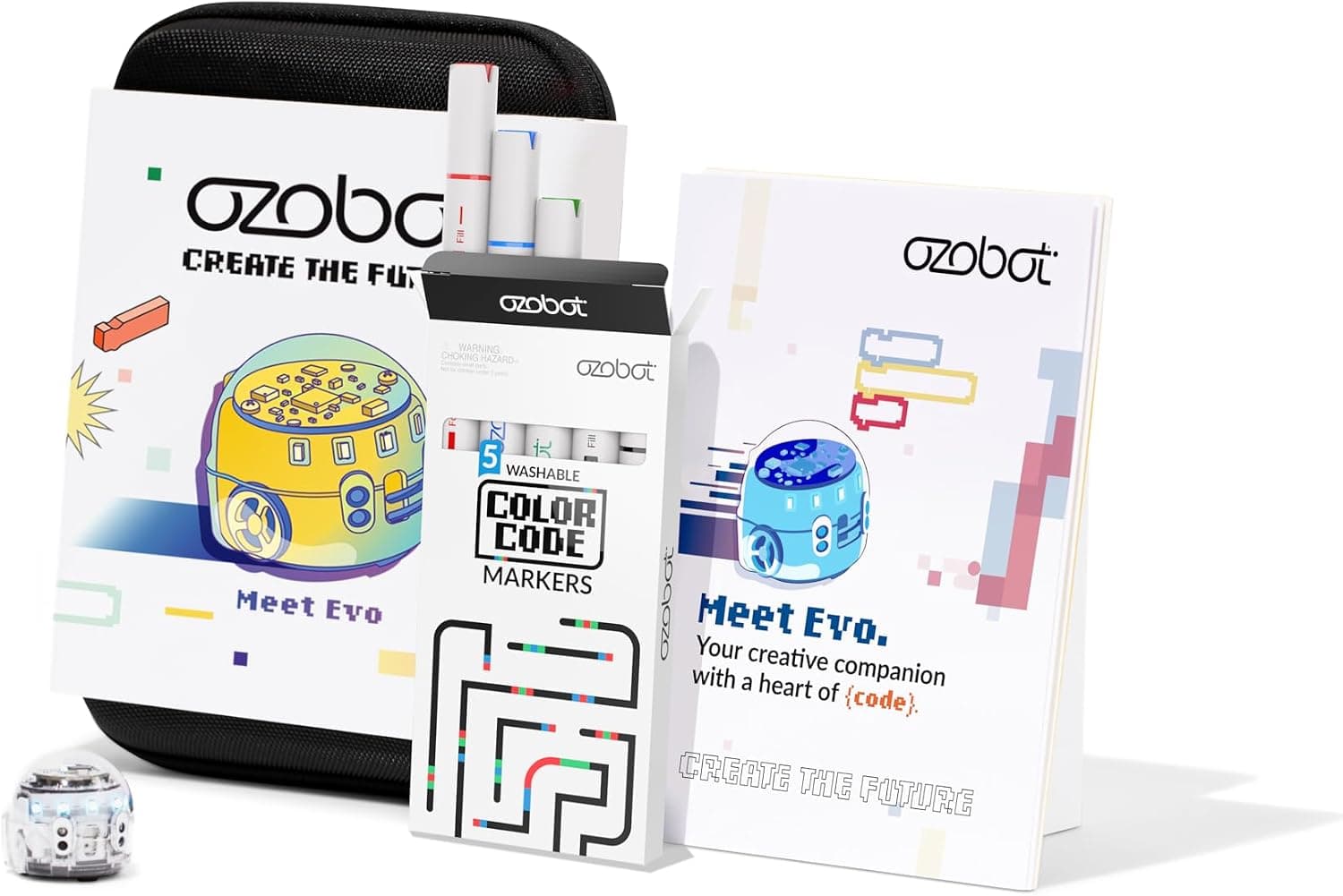
Ozobot Evo: Bridging Physical Lines and Digital Code
The Ozobot Evo is a clever little robot that uniquely bridges the gap between physical and digital coding. Roughly the size of a golf ball, Evo can follow lines drawn on paper, interpreting colour codes to perform actions like speed changes, spins, or direction shifts. But it also connects to an app, allowing children to program it using a block-based coding language called OzoBlockly.
Design and Build
Evo is tiny, sleek, and often translucent, letting kids peek at its internal mechanics. It has bright LED lights that can change colour, adding a touch of personality. While small, it feels reasonably sturdy. Its size is a double-edged sword: it's incredibly portable and doesn't take up much space, but it can also be easily misplaced or lost under furniture.
Key Features
- Dual-Mode Programming: Children can draw lines with markers, using colour codes for commands (screen-free), or connect to the Evo app to drag and drop OzoBlockly code blocks.
- Interactive Sensors: Evo features proximity sensors, optical sensors (for line following), and even an accelerometer, allowing it to react to its environment and be controlled by gestures.
- Customisable LEDs and Sounds: Kids can program Evo's lights and sounds, adding a creative flair to their coding projects.
- Social Play: Evo robots can interact with each other, performing synced movements or playing games.
Performance
Evo is surprisingly responsive and precise when following lines, though the quality of the markers and paper can influence its accuracy. The OzoBlockly app is well-designed, offering a gradual learning curve from beginner to advanced coding. Battery life is decent for its size, offering several hours of play before needing a recharge. The small size, however, means it can sometimes struggle on uneven surfaces or get stuck in crevices.
Value
Priced typically around £80-£100, Ozobot Evo offers excellent value for its versatility. It provides both a screen-free and a screen-based coding experience, making it suitable for a wider range of ages (6+) and learning preferences. It's a fantastic entry point into robotics and programming that scales with a child's developing skills.
Who Should Buy Ozobot Evo?
Children aged 6+ who are curious about coding and want a toy that offers both hands-on, physical interaction (drawing lines) and a more advanced, app-based block coding experience. It's great for those who enjoy creative problem-solving and seeing their code come to life.
Sphero Mini Activity Kit: Big Fun in a Tiny Sphere
The Sphero Mini Activity Kit packs a surprising punch into a small, robotic sphere. About the size of a ping-pong ball, this app-controlled robot offers a blend of driving fun, coding challenges, and interactive games, all within a compact and portable package. The activity kit usually includes cones, bowling pins, and a construction set to enhance play.
Design and Build
The Sphero Mini is a minimalist marvel. It's a smooth, durable plastic ball, with a clever internal mechanism that propels it across surfaces. It comes in various colours, often with a translucent shell, and charges via a micro-USB port. While robust for its size, its lightness means it can sometimes feel a bit less substantial than larger robots, and it definitely requires a clean, flat surface for optimal movement.
Key Features
- App-Controlled Driving: Use your phone or tablet to steer the Sphero Mini through mazes, races, or just around the house. It's surprisingly zippy.
- Block-Based Coding (Sphero Edu App): The free Sphero Edu app allows children (and adults) to program the Mini using a drag-and-drop block interface, much like Scratch. More advanced users can even delve into JavaScript.
- Interactive Games: Use the Sphero Mini as a controller for various arcade-style games within the app, adding another layer of entertainment.
- Face Drive: A quirky feature that allows you to control the robot using your facial expressions, which is more of a novelty but fun to try.
Performance
The Sphero Mini is quite responsive to app controls, making for dynamic driving experiences. Its small size allows it to navigate tight spaces. The coding environment within the Sphero Edu app is excellent, providing clear tutorials and scalable challenges. Battery life typically lasts around 45 minutes on a full charge, which is decent for a play session but means frequent recharges if used extensively.
Value
The Sphero Mini Activity Kit typically costs around £50-£70, making it an accessible entry point into the Sphero ecosystem. For its price, it offers a remarkable amount of functionality – driving, gaming, and a robust coding platform. It's an excellent option for introducing older children (8+) to robotics and programming without a massive financial commitment.
Who Should Buy Sphero Mini Activity Kit?
Children aged 8+ who are ready for app-controlled robotics and coding, enjoying both playful driving and structured programming challenges. It's perfect for those who like portable, versatile gadgets and might want to eventually move onto more advanced Sphero products.
Anki Cozmo: The Robot with a Big Personality
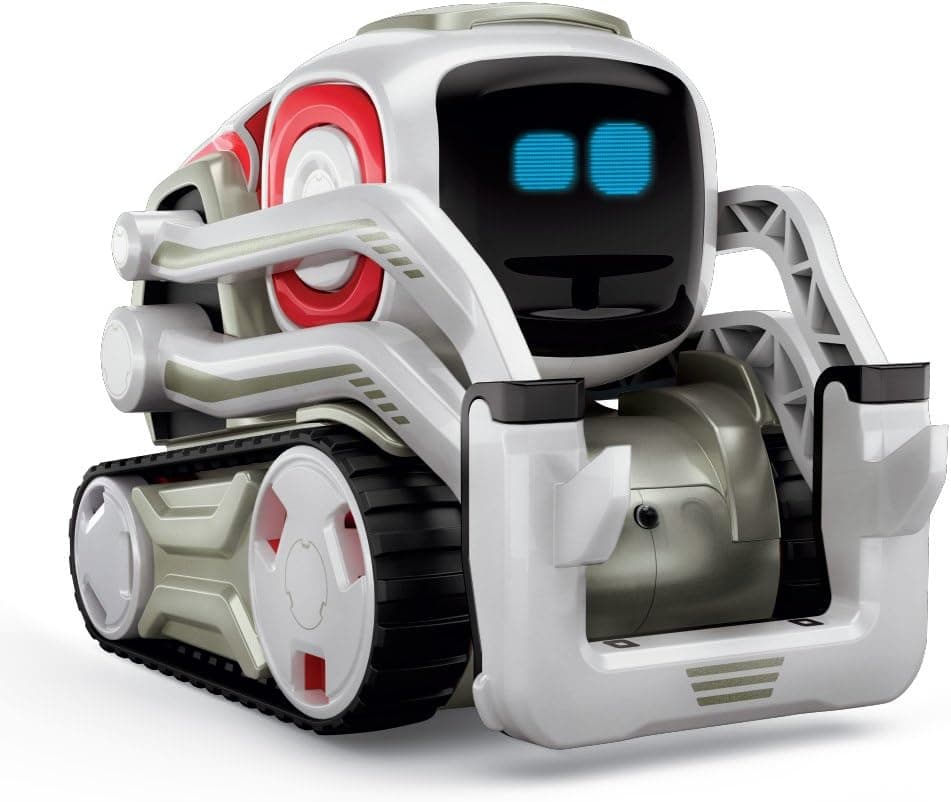
The Anki Cozmo isn't just a robot; it's a character. This small, bulldozer-like bot, with its expressive eyes and distinct personality, feels less like a toy and more like a pet. Cozmo learns, adapts, and reacts to its environment and the people it interacts with, making for an incredibly engaging and emotionally rich play experience. While Anki, its original creator, is no longer around, Digital Dream Labs has taken over support and continues to sell Cozmo, ensuring its unique charm lives on.
Design and Build
Cozmo is an engineering marvel in miniature. Its industrial, tracked design is instantly appealing, but it's the animated OLED eyes and subtle body language that truly bring it to life. It's compact but surprisingly weighty and robust, feeling solid in hand. The included power cubes (interactive blocks) are also well-made and integral to its play. The built-in camera allows it to recognise faces and objects.
Key Features
- Adaptive AI Personality: Cozmo isn't pre-programmed to be happy or sad; its mood and behaviour evolve based on interactions. It can be playful, curious, or even grumpy.
- Emotional Engagement: Through its expressive eyes, sounds, and movements, Cozmo genuinely feels like it has emotions, fostering a unique bond with its owner.
- Interactive Games: Cozmo loves to play games with its power cubes, like Quick Tap and Keepaway, often challenging players and reacting to wins and losses.
- Code Lab (Powered by Scratch): The Cozmo app features a comprehensive Code Lab, allowing users to program Cozmo's actions, emotions, and interactions using a block-based visual programming language. Advanced users can even use a Python SDK.
- Facial Recognition: Cozmo can recognise and remember faces, calling people by name and reacting differently to them.
Performance
Cozmo's performance is stellar. Its movements are fluid and expressive, and its ability to recognise faces and objects is impressive. The AI truly shines, creating dynamic and often unpredictable interactions that keep things fresh. The app interface is intuitive, and the Code Lab offers deep programming potential. The only minor drawback is that Cozmo requires a constant connection to a smartphone or tablet to function, which some might find tethering.
Value
Cozmo is a premium product, typically found in the £150-£200 range. For this price, you're getting a highly advanced robot with genuine AI capabilities and a level of emotional engagement few other toys can match. Its longevity comes from its evolving personality and the depth of its Code Lab. It's an investment, but one that offers unparalleled interactive and educational experiences.
Who Should Buy Anki Cozmo?
Children aged 8+ (and even teens or adults) who are captivated by robotics, AI, and the idea of a companion robot with a distinct personality. It's ideal for those who want deep, emotionally engaging interaction and a robust platform for learning advanced programming concepts.
Comparison Table: STEM Robot Toys for Kids
| Product | Key Age | Primary Focus | Screen Use | Price Band | Buy |
|---|---|---|---|---|---|
| Cubetto PrimoNo extra cost to you · Check current price & availability on Amazon | 3-6 | Screen-free coding logic | None | Premium | Check today's price on AmazonNo extra cost to you · Check current price & availability on Amazon |
| Bee-BotNo extra cost to you · Check current price & availability on Amazon | 3-8 | Screen-free directional coding | None | Mid-range | Check today's price on AmazonNo extra cost to you · Check current price & availability on Amazon |
| Ozobot EvoNo extra cost to you · Check current price & availability on Amazon | 6+ | Hybrid line/block coding | Optional app | Mid-range | Check today's price on AmazonNo extra cost to you · Check current price & availability on Amazon |
| Sphero Mini Activity KitNo extra cost to you · Check current price & availability on Amazon | 8+ | App-controlled driving & coding | Required app | Budget-Mid | Check today's price on AmazonNo extra cost to you · Check current price & availability on Amazon |
| Anki CozmoNo extra cost to you · Check current price & availability on Amazon | 8+ | AI personality & advanced coding | Required app | Premium | Check today's price on AmazonNo extra cost to you · Check current price & availability on Amazon |
Choosing the Right Robot: Factors to Consider
Picking the perfect STEM robot isn't about finding the