As an Amazon Associate I earn from qualifying purchases. This page contains affiliate links, and I may earn a commission at no extra cost to you.
Toniebox 2: Is This the Best Screen-Free Audio System for Kids? Plus Top Alternatives for Creative Play
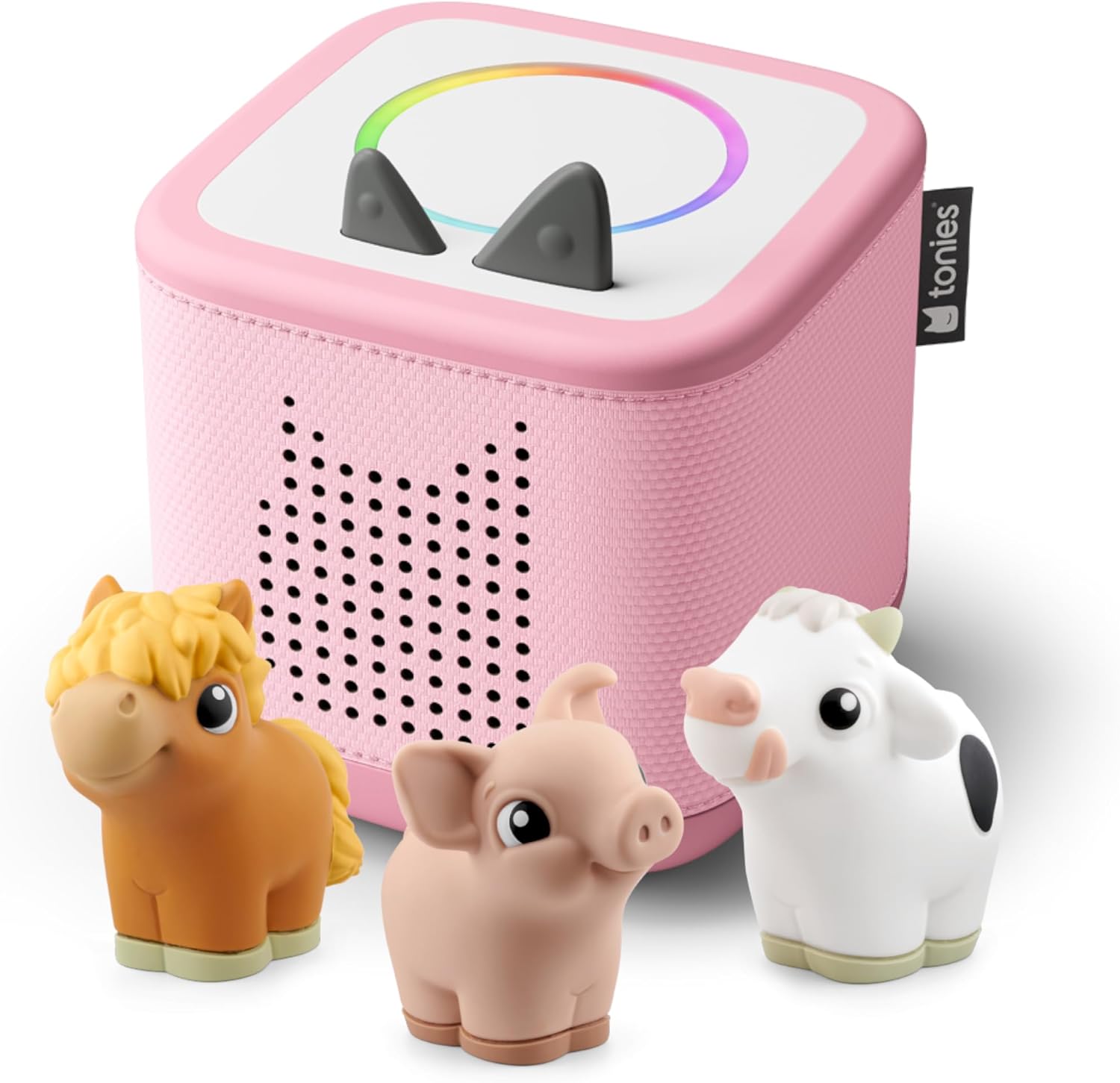
Parents know the struggle: finding engaging, enriching activities for kids that don't involve yet another screen. In August 2026, the market is full of devices promising digital entertainment, but the appeal of a genuinely screen-free experience for young children remains incredibly strong. That's where the Toniebox 2 comes in, positioning itself as the go-to audio system for imaginative play. But does it truly deliver on that promise, and how does it compare to other creative tech solutions like the Echo Dot Kids or even a smart soundbar like the Sonos Ray? Let's dive deep into the Toniebox 2 and explore its place in today's family tech landscape, along with some compelling alternatives.
What is the Toniebox 2?
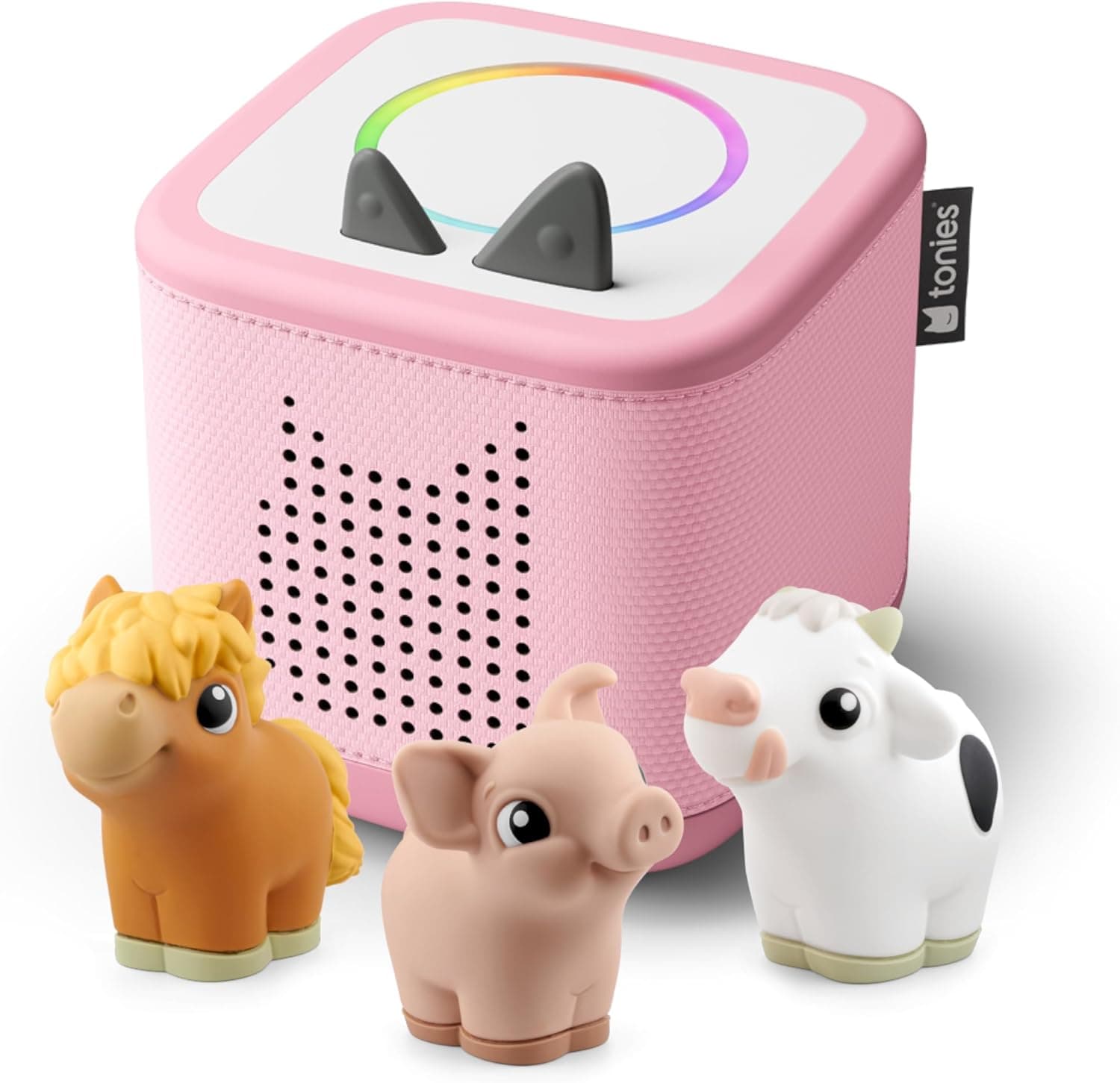
The Toniebox 2 isn't just another speaker; it's an entire ecosystem built around tactile storytelling. At its core, it's a soft, durable audio player shaped like a cube, designed specifically for little hands. The magic happens when kids place small, hand-painted figurines called "Tonies" on top. Each Tonie figure contains a story, songs, or educational content, which the Toniebox then plays. It's an incredibly intuitive system: put a Tonie on, and the audio starts; take it off, and it pauses. It really encourages independent play and engagement without the glowing distraction of a screen.
Design and Build: Kid-Proof and Intuitive
From the moment you unbox a Toniebox 2, its child-centric design is evident. The main unit is covered in a soft, padded fabric that's squishy yet robust – clearly built to withstand drops and enthusiastic handling from toddlers and preschoolers. There are no sharp edges, complex buttons, or confusing displays. Controls are minimal: two "ears" on top serve as volume controls (squeeze them to adjust), and a tap on the side skips tracks. The magnetic top ensures Tonies stay put during play, but are easy enough for small fingers to place and remove.
Based on published specs and verified owner feedback, this construction isn't just pretty; it's genuinely durable. Parents frequently report the Toniebox surviving tumbles and spills, which is a huge relief when investing in children's tech. The charging station is also thoughtfully designed, making it simple for even young children to place the box on its base, encouraging responsibility.
Key Features: More Than Just a Speaker
- Tactile Tonies System: The star of the show. Each Tonie figure is a physical key to digital content. This physical interaction is a powerful draw, blending traditional toy play with modern audio.
- Screen-Free Experience: This is the Toniebox's biggest differentiator. No distracting visuals, no endless scrolling, just pure audio that encourages imagination and listening skills.
- Creative Tonies: Beyond the pre-loaded story Tonies, "Creative Tonies" are blank slates. Parents can upload up to 90 minutes of custom audio via the MyToniebox app – personal messages, songs recorded by grandparents, or even stories made up by the kids themselves. This feature adds immense value and longevity, making it truly unique.
- Portability & Battery Life: The Toniebox is designed for adventure. With a claimed battery life of around 7 hours on a single charge (though real-world use can vary), it's perfect for car journeys, trips to grandparents, or moving from room to room.
- Wi-Fi Connectivity: While primarily offline once content is downloaded, initial setup, downloading new Tonie content, and managing Creative Tonies requires a Wi-Fi connection. This is generally a one-time or infrequent task once a Tonie is set up.
Performance: Sound Quality and Ease of Use
For a child's device, the Toniebox 2 offers surprisingly good sound quality. Reviewers and owners commonly report clear, crisp audio that's perfectly suitable for stories and music. It won't fill a large room with booming bass like a dedicated home speaker, but for a child's bedroom or a family car, it's more than adequate. Importantly, the volume levels are generally well-controlled, ensuring it's loud enough to hear clearly without being excessive.
The true performance triumph is its ease of use. A 3-year-old can master the Toniebox in minutes. The simplicity empowers children to choose their own entertainment, fostering independence and confidence. Parents appreciate this self-sufficiency, as it frees them up from constantly managing playback.
Value: Initial Investment vs. Ongoing Content Costs
The Toniebox 2 itself is a premium-priced device, typically around £80-£100, often bundled with a starter Tonie. However, the real consideration for value comes from the Tonie figures. Each official Tonie figure usually costs between £12-£18. Building a diverse library can quickly add up. While the Creative Tonies mitigate this somewhat by allowing free custom content, most families will want a selection of official story and song Tonies. This proprietary content model is a common point of discussion among owners – it ensures quality and a curated experience, but it's not a budget-friendly route compared to a streaming subscription with unlimited access.
For families who prioritize a curated, screen-free, and highly tactile experience, the ongoing cost is often seen as worthwhile, especially given the figures also double as physical toys. But it's important to go into it with eyes open about the total investment.
Ready to bring the magic home? Check today's price on Amazon for the Toniebox 2.
Toniebox 2 Alternatives for Creative Play and Entertainment
While the Toniebox 2 excels in its niche, it's not the only way to provide engaging entertainment for children. Different families have different needs, budgets, and comfort levels with technology. Here's how it stacks up against some popular alternatives.
Comparison Table: Screen-Free & Smart Entertainment for Kids
| Product | Key Feature | Age Range | Price Band | Verdict | Buy |
|---|---|---|---|---|---|
| Toniebox 2 | Tactile, screen-free audio with physical figures | 3-6 years | Premium initial, ongoing content | Excellent for young kids, promotes imagination | View on Amazon |
| Echo Dot Kids | Voice-controlled smart speaker with parental controls | 5-12 years | Mid-range | Smart, versatile, vast content library via Kids+ | View on Amazon |
| Amazon Fire TV Cube Kids Edition | Managed screen entertainment and streaming hub | 6-12+ years | Mid-range to Premium | Best for structured screen time with parental oversight | View on Amazon |
| Sonos Ray | Compact, high-quality soundbar for family audio | All ages (general family use) | Premium | Great sound for shared spaces, not kid-specific | View on Amazon |
Deeper Dive: Alternatives to the Toniebox 2
Echo Dot Kids: Smart Assistant with a Child-Friendly Twist
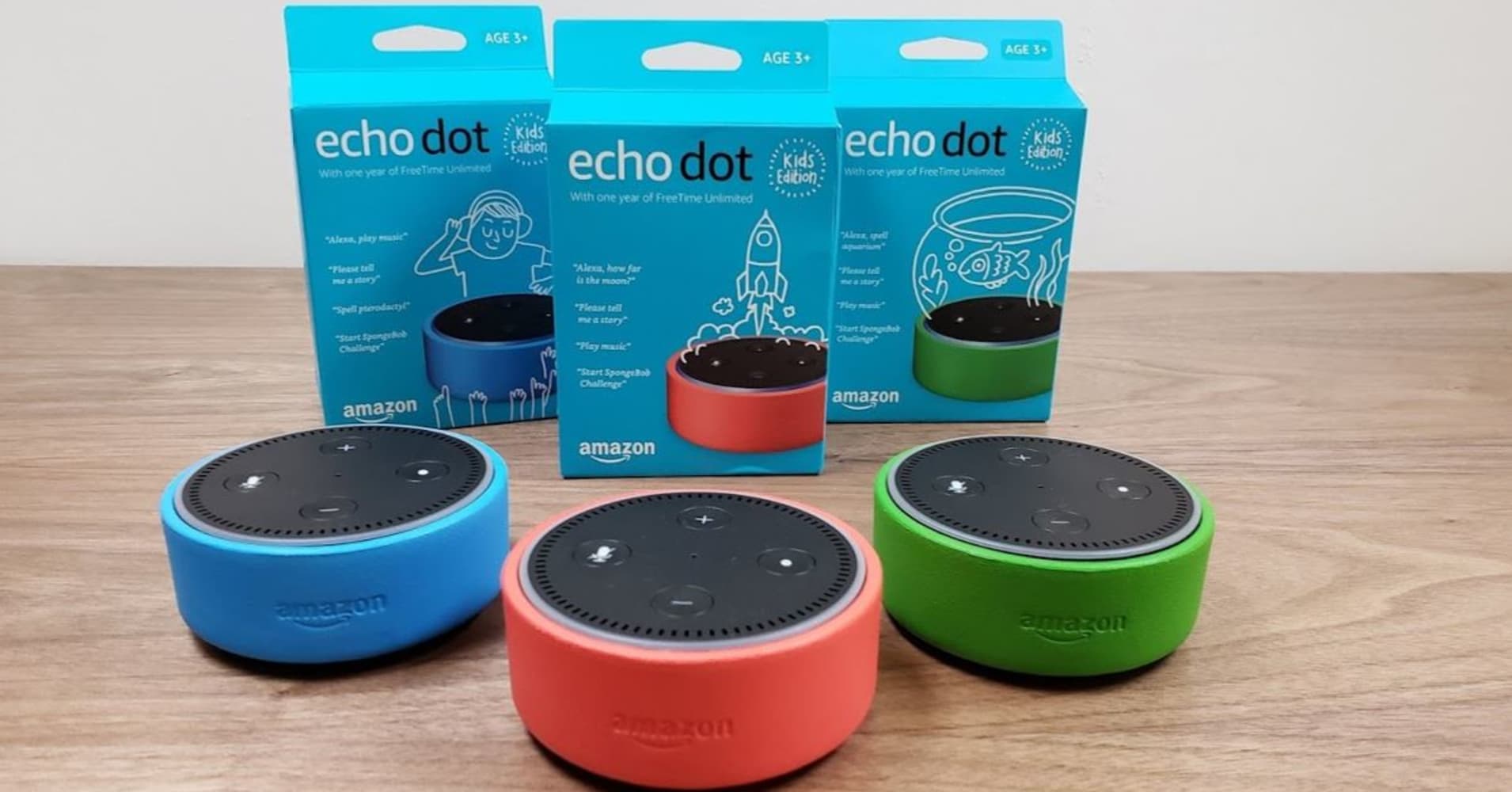
For parents looking for more interactive features and a wider range of content beyond just stories and songs, the Echo Dot Kids is a compelling option. Essentially a standard Echo Dot smart speaker but with a vibrant design and pre-loaded with a year's subscription to Amazon Kids+, it shifts the focus from tactile figures to voice interaction.
What it offers: The Echo Dot Kids is a fully functional smart assistant. Kids can ask Alexa questions, hear jokes, play educational games, listen to audiobooks, and stream music from Amazon Kids+. The Kids+ subscription is key here, unlocking thousands of child-friendly audiobooks, songs, and Audible Originals. Parental controls are robust, allowing you to filter explicit songs, set time limits, approve contacts for calls, and review activity through the Amazon Parent Dashboard. The "screen-free" aspect is slightly different here – there's no visual screen, but the interaction is still digital and responsive, much like talking to a screen. It's less about imaginative play with physical objects and more about direct engagement with a smart AI.
Pros: Wide range of content via Kids+ (books, music, skills), voice-controlled convenience, excellent parental controls, can be part of a larger smart home ecosystem, usually more affordable than the Toniebox. Often comes in cute animal designs, too.
Cons: Lacks the tactile, physical play element of the Toniebox. Some parents may still have reservations about a device that constantly listens for voice commands, even with Amazon's privacy assurances. While screen-free in the visual sense, the "always-on" interactive nature might feel less truly disconnected than the Toniebox.
Who it's for: Best suited for slightly older children (5+) who are ready for voice commands and interactive learning, or families already comfortable with smart assistants and Amazon's ecosystem. It's a versatile hub for information and entertainment.
For a smart, interactive audio experience, consider the Echo Dot Kids from Amazon.
Amazon Fire TV Cube Kids Edition: Managed Screen Time for Older Kids
If your children are beyond the toddler phase and you're ready to introduce controlled screen time, or if you already rely heavily on streaming services, the Amazon Fire TV Cube Kids Edition is an intriguing, albeit very different, alternative. This isn't a screen-free device; it's a full-fledged streaming media player designed for a TV, bundled with parental controls and curated content.
What it offers: The Fire TV Cube Kids Edition transforms any TV into a smart entertainment hub specifically for kids. It includes a year of Amazon Kids+, granting access to thousands of age-appropriate movies, TV shows, games, and educational apps. The biggest draw is the comprehensive parental controls: you can set screen time limits, restrict access to certain apps or content, and manage usage from the Parent Dashboard. The Cube also integrates Alexa for voice control, making it easy for kids to find content without typing. Unlike the basic Fire TV Stick, the Cube is a more powerful device, often offering 4K streaming capabilities and quicker performance, meaning a smoother experience for demanding games or high-resolution content.
Pros: Excellent for managed screen time, vast library of video and interactive content, robust parental controls, voice remote simplifies navigation, integrates with existing TVs.
Cons: Fundamentally a screen-based device, directly opposite to the Toniebox's "screen-free" premise. Requires a TV to function. The "Kids Edition" typically refers to the bundled Kids+ subscription and a protective remote cover, rather than a drastically different hardware design from the standard Fire TV Cube.
Who it's for: Families with elementary-aged children (6+) who want to provide curated, controlled screen entertainment. It's ideal for those seeking to blend educational apps with popular kids' shows and movies, all under careful parental supervision.
For a powerful, managed screen experience, explore the Amazon Fire TV Cube Kids Edition.
Sonos Ray: Premium Audio for the Whole Family
Now, the Sonos Ray might seem like an outlier in a discussion about kids' entertainment, and that's fair. It's a compact soundbar designed to enhance TV audio and stream music in a main living space. However, it represents an entirely different approach to bringing audio into a family home – one that prioritizes sound quality and shared enjoyment over child-specific features.
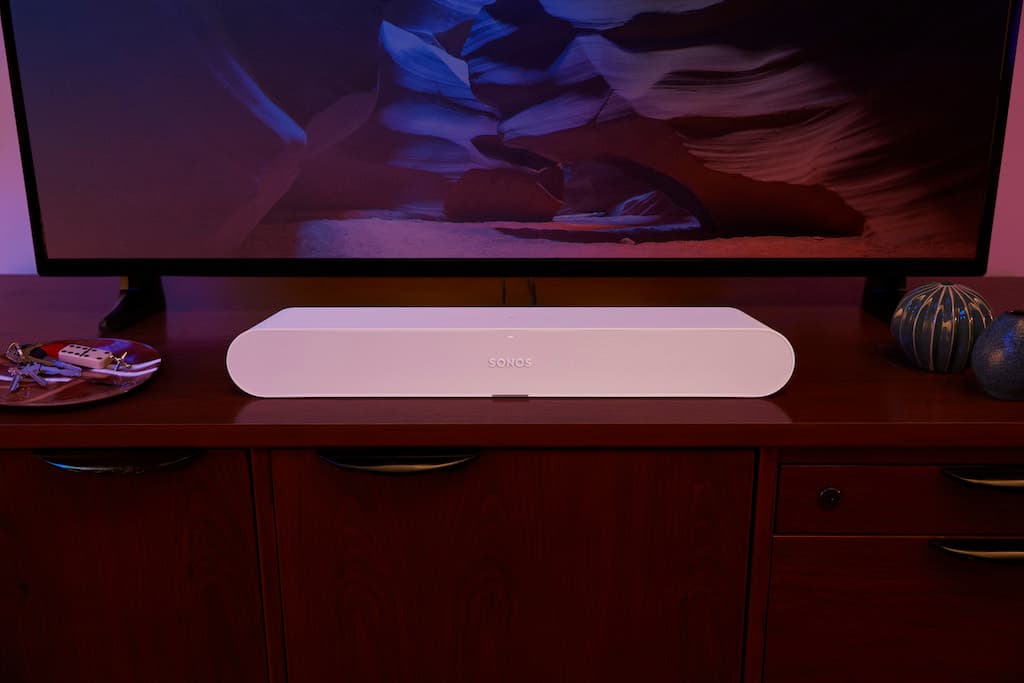
What it offers: The Sonos Ray delivers surprisingly rich, balanced sound for its size and price band. As an entry point into the Sonos ecosystem, it's designed for simple setup and seamless integration with other Sonos speakers for multi-room audio. While it doesn't have kid-specific controls or content, it can play any audio content streamed from a phone or tablet (via the Sonos app) – including kids' music, audiobooks, and podcasts from services like Spotify, Apple Music, or YouTube Music. The appeal here is that it's a high-quality audio solution for the whole family, suitable for shared spaces like a playroom or living room where both adults and children will be present. Instead of a dedicated kids' device, you get a premium speaker that can simply play kids' content when desired, but also serve adult listening needs without compromise.
Pros: Excellent sound quality for music and TV audio, compact design, easy setup, part of the expandable Sonos multi-room ecosystem, streams from virtually any audio service. No built-in microphone for voice assistants, which some parents prefer for privacy.
Cons: Not designed for kids; lacks child-specific controls, durability, or content curation. Significantly more expensive than the Toniebox or Echo Dot Kids, positioning it in the premium range (roughly £250-£300). Requires a separate device (phone/tablet) for content selection and playback. Needs to be plugged into power and typically connected to a TV (though it can stream audio independently).
Who it's for: Families who prioritize superior audio quality for shared spaces and want a versatile speaker that can serve everyone. It's a "family audio" solution rather than a "kids' audio" solution. If you want a great sound system that can play kids' content, rather than a system designed for kids, the Ray is a strong contender.
For a fantastic family sound experience, consider the Sonos Ray soundbar.
The Toniebox 2: Who Should Buy It?
The Toniebox 2 is genuinely brilliant for its target audience: toddlers and preschoolers (roughly ages 3-6). If you're looking to minimize screen time, encourage independent imaginative play, and want a durable, easy-to-use device, it's a stellar choice. Its tactile nature makes it far more engaging than simply tapping a screen or issuing a voice command, connecting physical play with digital stories in a unique way. Parents who value curated content and don't mind the proprietary ecosystem will find its charm infectious.
However, for older children, or those seeking broader functionality like smart assistant features or integrated video content, the alternatives like the Echo Dot Kids or the Amazon Fire TV Cube Kids Edition offer more diverse entertainment options, albeit with different compromises.
Verdict: Is the Toniebox 2 Worth It?
The Toniebox 2 delivers a truly enchanting, screen-free audio experience, perfect for nurturing imagination and independence in young children. Its robust design and intuitive operation make it a standout for parents seeking a respite from screens, despite the ongoing cost of its proprietary Tonie figures. If you have toddlers or preschoolers and prioritize tactile, imaginative play over smart features or broad content libraries, the Toniebox 2 is an unparalleled choice.
Ultimately, the "best" device depends on your family's unique needs and the age of your children. For pure screen-free audio magic, the Toniebox 2 holds a special place. For interactive smart features, the Echo Dot Kids takes the lead. And for managed screen time, the Fire TV Cube Kids Edition is a powerful option. But for truly unplugged, imaginative listening, the Toniebox 2 remains our top recommendation.
Ready to make a choice for your family? Explore the Toniebox 2 and its accessories on Amazon now.